

Short answer: choose a media console about 8–16 inches wider than your TV in total (roughly 4–8 inches on each side), at least as deep as the TV's base, and rated for the TV's weight. Measure the TV's actual width, not its diagonal, then confirm the room can handle the cabinet's width and depth.
When comparing TV stands and media consoles, start with the quick-reference table below, then use the checklist near the end of this guide to confirm the final choice.
Table of Contents
Quick Reference: Console Width by TV Size
The widths below are approximate for standard 16:9 televisions. Your TV's real width depends on the model, so check its spec sheet.
TV size | Approx. TV width | Suggested console width | Typical wall it suits |
55 inch | 48 in | 56–64 in | Compact living rooms, bedrooms |
65 inch | 57 in | 65–73 in | Most living rooms |
75 inch | 65 in | 73–81 in | Larger living rooms |
85 inch | 74 in | 82–90 in | Wide walls, media rooms |
These ranges are a styling guide for balance. They do not replace the support and load checks covered below.
Example: a 65-inch TV (about 57 in wide) centered on a 73-inch console leaves about 8 inches on each side. The TV's feet must sit fully on the console's top surface.
Measure the Television Three Ways
Record the TV's overall width, its height, and the footprint of its installed feet or pedestal. The diagonal in the product name describes the screen only. It does not tell you the outside dimensions or where the supports land.
Use the dimensions for your exact TV and stand configuration, and only use foot positions the manufacturer approves.
If the TV will rest on the console, find the continuous load-bearing surface under every support point. Gaps, raised borders, and changes in level can break up that surface, so a console's maximum overall width does not always describe one uninterrupted platform.
If the TV will be wall-mounted, you can choose the cabinet mainly for proportion and storage. Plan the mount separately, using the correct wall, bracket, and installation instructions.
Choose Width: Support First, Then Proportion
Support is pass-or-fail. Rule out any console that cannot hold the TV's base as instructed. Then compare how the remaining widths look under the screen.
For balance, a margin of about 4–8 inches on each side is a good place to begin. Tape the proposed width on the wall or floor and view it from the sofa. A broad wall can handle a longer cabinet, while a narrow wall between doorways usually looks better with a more restrained one. Also compare it with nearby bookcases, windows, and the sofa.
Avoid buying extra width just to display more objects. An uncluttered console that fits the room is easier to live with than a larger one filled with accessories.
Depth Affects Both the TV and the Room
Measure the TV base from front to back, then check the console's usable top depth. Curved edges, raised borders, or a recessed top can reduce the area available for the feet.
Most media consoles are about 15–20 inches deep. Inside the cabinet, measure equipment with its cables attached, since a receiver or game console may need extra room for connectors and airflow.
On the room side, add the cabinet's depth to the gap needed behind it. That total is how far it projects into the room. Mark it with tape, open the doors or drawers in your mock-up, and make sure walkways stay usable.
Product Examples by TV Size and Room
These three consoles show how the width rule plays out. For each, the "suits" range applies the table above to the listed width; confirm the maximum TV size and load rating on the product page.
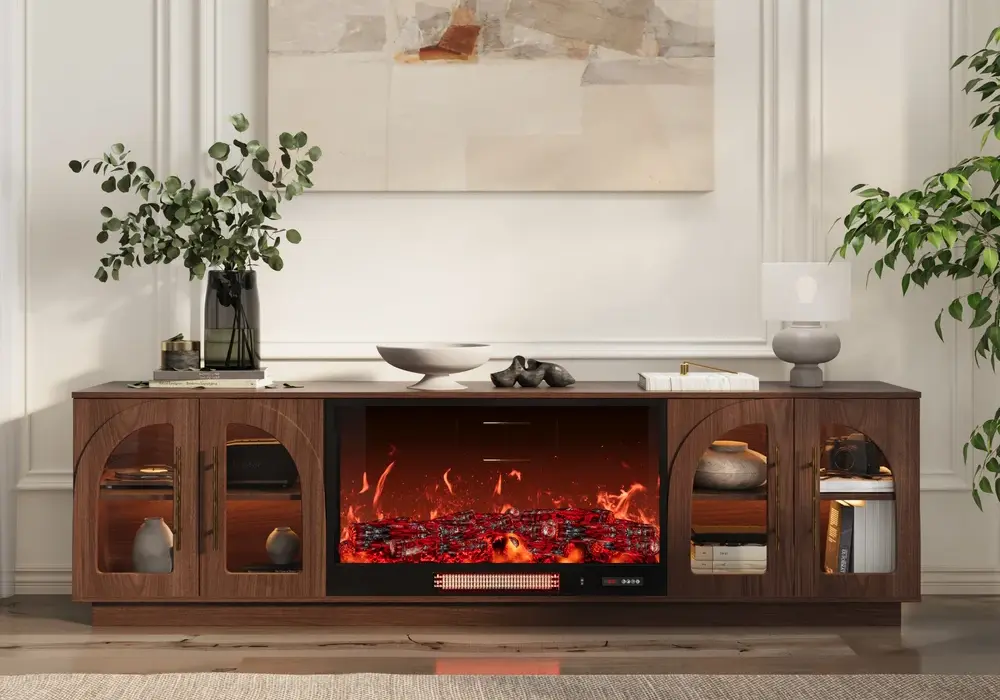
The Arune 80-inch ash-veneer electric fireplace TV stand is a fixed-width piece at 80 inches wide, 18 inches deep, and 23 inches high.
- Suits: 65–75-inch TVs, based on the width rule.
- Best for: a living room with a feature wall at least 85 inches wide, where you want the warmth of a fireplace as a focal point.
- Keep in mind: the fireplace takes up space that other consoles use for storage, so list what needs a compartment first.
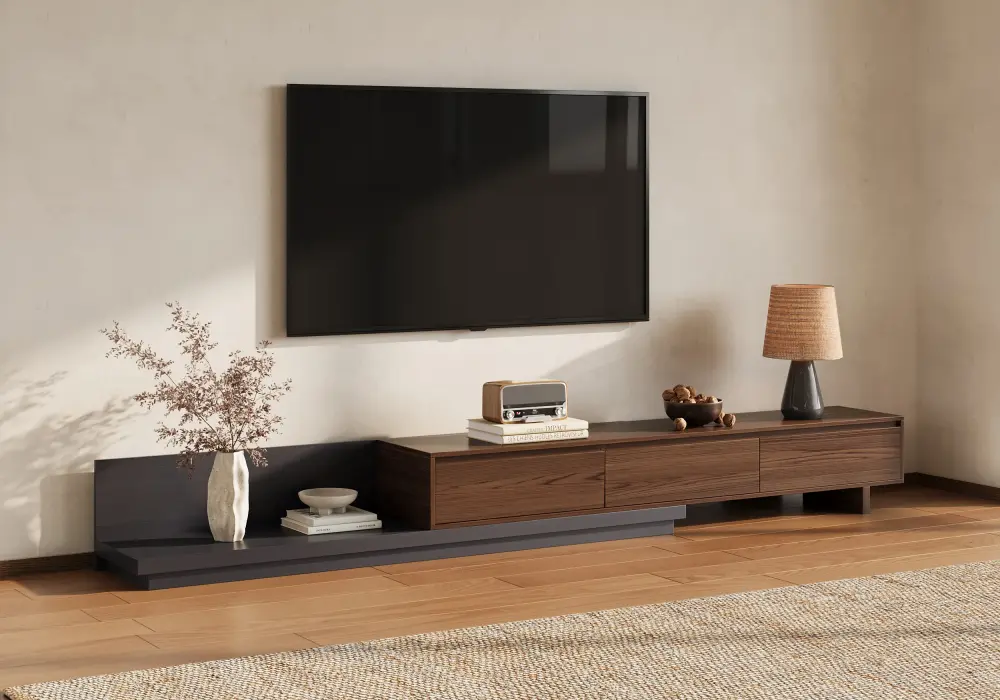
The Fero extendable TV stand with three drawers adjusts from 79 to 142 inches wide and is 16 inches deep and 14 inches high.
- Before extension (79 in): suits 65–75-inch TVs. A 75-inch TV (about 65 in wide) is the best match, leaving about 7 inches on each side.
- After extension (142 in): suits 75–85-inch TVs centered on the cabinet. The extra length gives you room on both sides for lamps, speakers, or decor.
- Best for: long walls, open-plan rooms, or a room where you may change the layout later. The low 14-inch height also suits a TV mounted on the wall above it.
- Keep in mind: extending the cabinet makes it longer, not stronger. Confirm which section is approved to carry the TV.
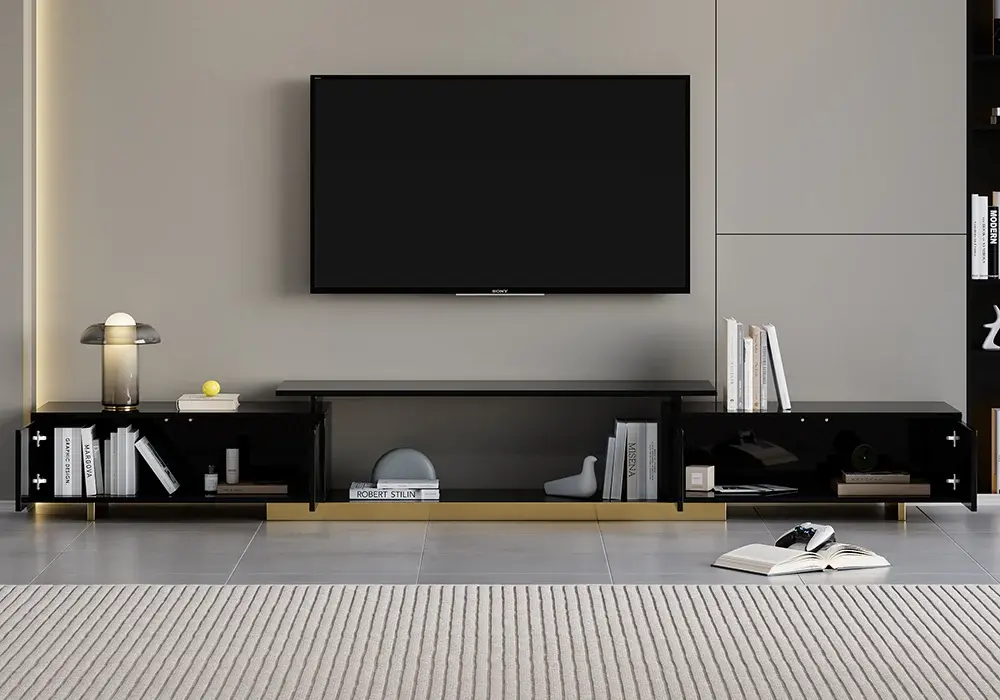
The Mordel 63–94-inch extendable hidden-storage TV stand ranges from 63 to 94 inches wide and is 16 inches deep and 14 inches high.
- Before extension (63 in): suits 55–65-inch TVs. A 55-inch TV (about 48 in wide) looks balanced, while a 65-inch TV (about 57 in wide) leaves only about 3 inches on each side.
- After extension (94 in): suits 75–85-inch TVs. An 85-inch TV (about 74 in wide) leaves about 10 inches on each side.
- Best for: narrower rooms or walls where a fixed cabinet would crowd a doorway, and for people who want concealed storage.
- Keep in mind: the shallow depth saves floor space, but check that your TV base and equipment fit within it.
Weight, Storage, and Safety
Load. Find the TV's weight with its tabletop stand installed and compare it with the console's rating for the surface that will hold it. Add any other objects sharing that surface. For example, a 50-pound TV plus a 10-pound device is a 60-pound load before anything else is added.
Storage. List each device by width, height, and depth, plus its ventilation and cable needs. Manufacturer ventilation guidance, stresses keeping vents unobstructed and following your model's instructions. Keep operating devices in compartments with airflow, and use closed drawers for remotes, manuals, and spare cables.
Anchoring. The CPSC's Anchor It campaign recommends anchoring televisions and furniture, and placing TVs on a stable, low stand. A console being wide enough does not replace that installation step. Plan suitable anchoring as part of the setup, and follow the manufacturers' instructions for both the TV and the furniture.
Pre-Purchase Checklist
Run each candidate through this list before ordering. If the product page doesn't answer a question, ask the seller.
Question | What to measure or confirm |
Can the TV rest on top? | Full base footprint fits on one supported surface; TV weight is within the rated load |
Does it fit the wall? | Usable wall width, with room left near doors and windows |
Do devices fit inside? | Equipment dimensions with cables, plus airflow space |
Can people move past it? | Cabinet depth plus wall gap, with doors and drawers open |
If extendable, does it work extended? | Approved configuration and which section holds the TV |
Can it be delivered and assembled? | Package size, stairs, elevator, and assembly space |
Make a Full-Size Mock-Up
Use finish-safe tape to mark the width and depth on the floor, and place lightweight boxes at the proposed height if helpful. Stand at the room entrance, sit on the sofa, and walk the busiest route. Allow for the baseboard and the real gap behind the cabinet, and keep plugs reachable.
Open the drawers or doors from where you would stand. If using the storage means moving a chair each time, the layout needs rethinking.
Frequently Asked Questions
Should a media console be wider than the TV?
Usually yes. About 4–8 inches of extra width on each side looks balanced for most rooms. Treat that as a styling choice, since a tabletop TV also needs its full base supported on the intended surface.
Can I choose a console from the TV's diagonal size?
Use the diagonal as a starting point only. For a 65-inch TV, a console around 65–73 inches wide is a sensible first range, but measure the actual TV width and base before buying, because feet and overall dimensions vary between models.
Is a deeper media console always better?
No. Look for about 15–20 inches of depth. That is usually enough for the TV base and common devices, and anything deeper takes more room from the floor space.
Does extending a console let it support a larger television?
Not automatically. Extra length does not create a bigger TV platform or a higher load rating. Check the approved extended configuration and the capacity of the section that will hold the TV.
How much storage should I plan for future equipment?
Plan for one likely addition, such as a second game system or streaming box. Flexible compartments with good airflow are worth more than extra exterior size.