

Usually, yes: a media console that is wider than the TV creates a more balanced composition and leaves useful surface at either side. When comparing TV stands and media consoles, use the television's actual outside width, not its advertised diagonal size. Then check support, foot placement, depth, and load capacity separately. Extra width is a styling choice, and it does not by itself confirm that a stand can support your screen.
A practical starting point is around 3–6 inches of console beyond each side of the TV. Treat that as a visual preference to test in your room, not a safety rule or an industry requirement. A broad wall can carry larger margins, and a narrow alcove may need a tighter composition. Manufacturer instructions govern the physical installation in every case.
Table of Contents
Compare actual width instead of diagonal size
A television's advertised screen size describes its diagonal. It does not tell you the width of the cabinet, the spread of the feet, or the depth of the base. Two screens with the same diagonal can have different outer dimensions and different support arrangements, so find the dimensional drawing for your exact model before you shop for furniture.
For a quick estimate, a standard 16:9 screen is about 87% as wide as its diagonal. Real cabinets vary with bezel and stand design, so use the table for planning only and confirm against the spec sheet.
Advertised size | Approximate screen width |
43" | 37.5" |
55" | 48" |
65" | 56.5–57" |
75" | 65.5" |
85" | 74" |
Record three separate figures: overall width, footprint with the supplied base or feet installed, and total weight in the configuration you intend to use. If you will wall-mount the TV, the console no longer carries its weight, but it still has to suit the wall visually and hold your equipment.
For a centered arrangement, subtract the TV's width from the console's width and divide by two. A TV that is 58 inches wide above a 70-inch console leaves 6 inches per side. That number describes how the pair will look from the front. It says nothing about whether the TV's feet fit front to back, which is a separate check.
Choose side margins that suit the whole wall
The console and screen do not exist in isolation. Include adjacent doors, curtains, speakers, outlets, and any floor lamp when you judge the composition. An extra-wide console can anchor a large blank wall, but it can also crowd an entry or make a small room feel stretched sideways.
Arrangement | Visual starting point | Separate practical check |
Centered TV above console | Similar visible margins at both ends | Wall and furniture installation instructions |
TV standing on console | Console generally wider than screen | Feet fully supported, suitable depth and capacity |
Wall-mounted TV in a narrow alcove | Fit the usable wall before adding décor | Mounting structure, ventilation, cable route |
Long console with offset storage | Balance the whole arrangement | Approved extension position and supported zones |
Console with speakers or artwork | Reserve room for each object | Equipment clearance and total supported load |
Start with a paper outline of the TV on the wall and painter's tape marking the console's width below it. Sit in your normal viewing position and look at the result. If the console feels too long, shorten the proposed footprint before adding ornaments to fill the ends. The furniture should fit the room's architecture as well as the television.
Height matters too. Choose the screen's position from your seated eye level, so that the middle of the screen sits roughly at eye height, and not from a fixed decorative gap above the console. Low consoles of about 14–16 inches make this easier because they leave more wall for the screen to sit at a comfortable height.
Check support, depth, and anchoring first
Before styling, confirm the basics. For a TV resting on furniture, the full base or every foot must sit on a supported surface in the position the manufacturers allow. Check front-to-back clearance as well as left-to-right spacing, because a screen that overhangs may look fine in a photo while the feet underneath do not fit correctly.
The US Consumer Product Safety Commission’s Anchor It! guidance recommends furniture designed to hold a television, and securing both TVs and furniture according to manufacturer instructions. Plan compatible anchoring during setup. A wider console does not replace anchoring, and décor should not hide mounting points or block access needed for installation.
Then plan the practical details:
- Cables. Leave room behind or inside the console for plugs and power strips. Cables stored in a drawer stay tidy, but equipment that gives off heat needs open space around it.
- Access. Allow room to open drawers and doors fully, and keep a clear path to the ends of the console. A nearby armchair can make the last section of a long console hard to use.
- Sensors. Keep the remote sensor and soundbar unobstructed, and place decorative objects at the ends, away from the screen.
Once these checks pass, add only what the available margin can hold comfortably. A shallow bowl at one end and a low stack of books at the other is often enough.
Three extendable consoles for three kinds of walls
An extendable console lets you test different margins without committing to one fixed length. Set it to the width you tried with tape, then adjust. These three cover wide living-room walls, compact apartments, and rooms where the layout has to flex.
For a broad media wall: Velar 71–114-inch Sintered Stone Top
The Velar 71–114-inch Sintered Stone Top Extendable TV Stand is the statement piece of the three. Sculptural fluting and an oval silhouette give the front a soft, architectural rhythm. The pale sintered stone top resists heat and scratches and wipes clean easily.
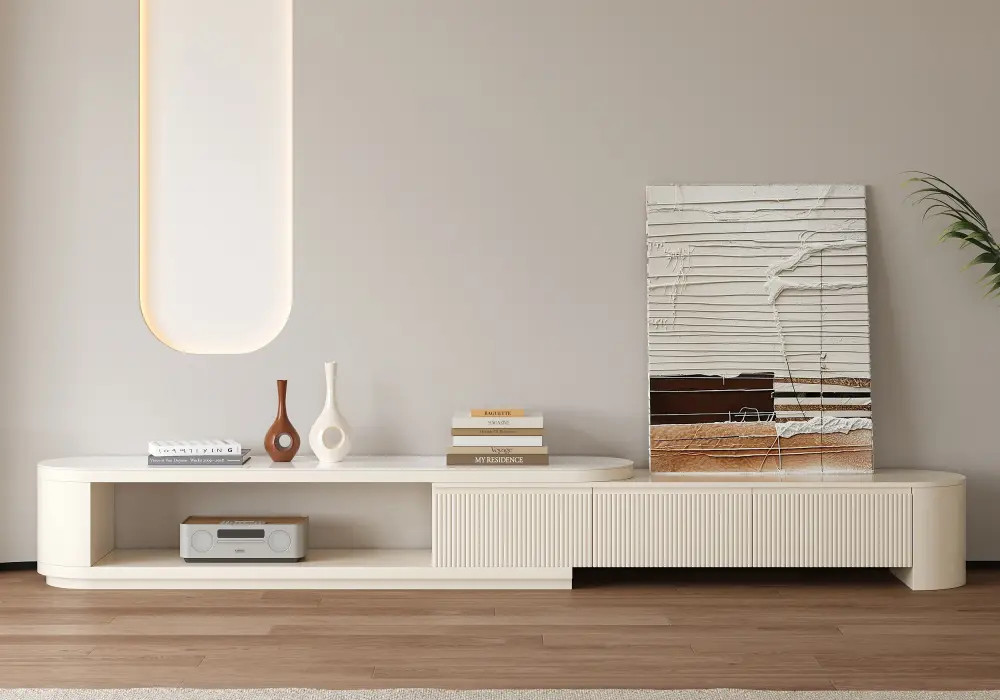
In your room: Picture a family room with a wall about 9 feet wide and a 75-inch-class TV roughly 65 inches across. Extend the Velar to about 90 inches and each side gains around 12 inches. That is more than the 3–6-inch starting point, but on a wall this broad the extra margin is welcome. It is enough for a ceramic lamp on one end and a stack of books on the other, with the stone top showing off both. At 16 inches deep and 14 inches high, the console reads as a long, calm base under the screen. The performance-engineered wood frame has a listed capacity of 330.7 pounds, so a large TV, a soundbar, and a few decorative pieces sit on it comfortably.
Three soft-close drawers keep the clutter out of sight. Game controllers, streaming sticks, remotes, and HDMI cables each get a home, and the drawers close silently, which you will appreciate during a late-night movie.
For compact apartments and flexible rooms: Fero 47–71-inch Extendable
The Fero 47–71-inch Extendable Hidden Storage TV Stand is the one to choose when wall space is limited. It expands from 47 to 71 inches, so you can fit it to the exact width of your wall instead of settling for the nearest standard size.
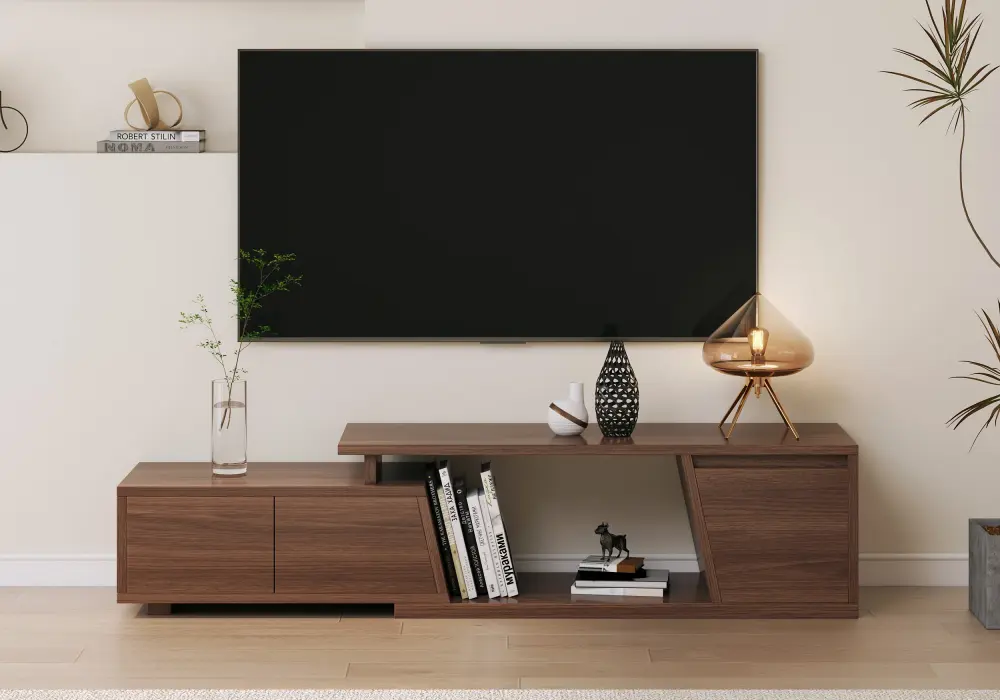
In your room: Take a studio apartment with a 55-inch TV about 48 inches wide. Set the Fero to roughly 60 inches and you get about 6 inches of console on each side, the top of the range that looks balanced. The walnut tone adds warmth to a small living area, and the 16-inch depth and 16-inch height keep the footprint tidy beside a sofa or under a window.
The three deep drawers are the daily-use feature. Remotes, chargers, and cables go inside instead of tangling on the surface, and the quiet soft-close runners mean no slamming while a roommate sleeps or a baby naps. The FSC-certified wood is a bonus if you want furniture that is easy on the conscience as well as the eye.
For flexible layouts and ambient light: Quoint 71–100-inch with LED
The Quoint 71–100-inch Extendable TV Stand with 3 Drawers and Light suits rooms that don't offer a perfectly symmetrical wall. It extends from 71 to 100 inches, and its cabinets can be positioned left or right, so the storage lands where you need it.
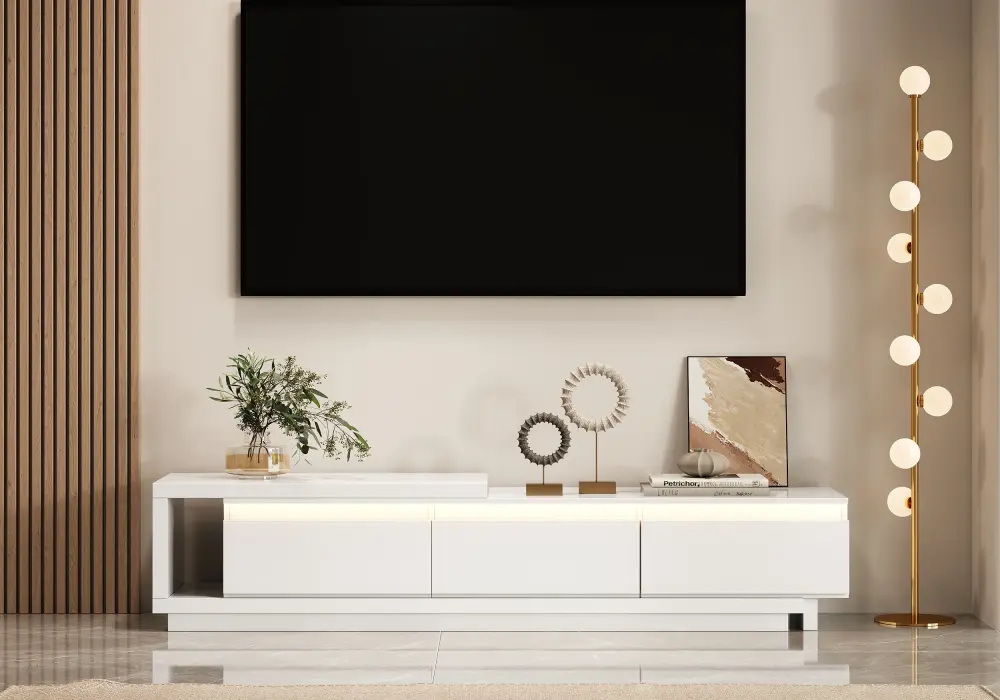
In your room: Say your living-room wall has a door at one end and a window at the other. Put the drawer cabinet on the window side, away from foot traffic, and keep the open top section clear on the door side. With a 58-inch-wide TV on the 71-inch setting, you get about 6.5 inches of margin per side. At 100 inches, the console has room for a speaker pair and a plant as well. At 15 inches deep and 16 inches high, it stays visually light even at full extension.
The integrated LED lighting casts a warm glow that illuminates your media and brightens the room, which makes evening viewing feel more cinematic. The wear-resistant top handles everyday use, so a hot mug, a set-top box, or a kid's toy leaves no marks. The three drawers keep daily essentials organized, which suits both rented apartments and homes you own.
Frequently Asked Questions
How much wider should a media console be than the TV?
For styling, test about 3–6 inches per side as a starting point, then adjust to the wall and the furniture around it. Broad walls can take more. The support requirement depends on the TV base, the furniture instructions, depth, and loading limits, so a chosen visual margin cannot confirm installation compatibility.
Can the media console be the same width as the TV?
Yes, and it creates a tightly aligned look, especially beneath a mounted television. Compare exact outside dimensions rather than diagonal size labels. If the television stands on the console, its complete base or feet must fit a supported area, and all capacity and anchoring requirements still apply.
Can a console be too wide for a television?
Visually, yes. A small screen above a very long cabinet can feel disconnected unless the rest of the wall supports that composition. Try the combination with tape outlines before you buy. Larger side margins make the most sense when they serve storage or other equipment rather than existing only to hold more decoration.
Does extending a TV stand increase its weight capacity?
Do not assume so. Extension changes the arrangement and may change which surfaces are supported. Use the manufacturer's loading and assembly instructions for the exact position you plan to use. If a product page gives only one capacity figure without explaining how it applies, ask for clarification before placing the TV or heavy equipment.
Does a wall-mounted TV need a console underneath?
No. A console is optional when the television is independently mounted, but it still provides storage, a place for equipment, and a visual base. Choose it for those jobs and for the room's available space, and plan the wall mounting, cable routing, equipment cooling, and furniture anchoring alongside it.